
ClubGG Clubs Guide: Join & Choose Safe Clubs
A join request sits unanswered for three days. The club looked lively in the screenshot someone forwarded, the identifier was pasted into a group chat, and the person who shared it has gone quiet. Two other clubs approved the same request in the meantime, so now there are three open invitations and no obvious way to compare them.
That gap — between a club that looks active and one that actually is — is what this page is about. Getting into a ClubGG club takes a minute. Choosing one you will still enjoy in six months takes a little more thought, and most of that thinking happens before you tap join.
What a ClubGG club actually is
ClubGG is the app. Clubs are the rooms inside it, and most of what shapes your experience is decided by whoever runs the room rather than by the platform. The owner chooses the game formats, writes the rulebook, sets the schedule, appoints moderators, and decides how quickly questions get answered.
That division explains a lot of the confusion new players run into. Two clubs can offer the same format, the same table sizes and the same level structure, and still feel nothing alike. In one, a moderator settles a disagreement in ten minutes. In another, the same argument is left to simmer for a week. One publishes its rules where any member can find them; the other runs on custom and hearsay, and you find out how it works only when something goes sideways at two in the morning.
Every club also carries its own identifier — a short code that works like a room number. Sometimes people call it a club ID. Either way, there is no way to browse your way into one specific club without it. You either receive the identifier from someone you trust, or you take it from a listing that has been checked. That single detail shapes how joining works, so it is worth understanding before anything else.
If you are still deciding whether the app itself suits you, the ClubGG app overview covers the client, the table layout and the way clubs appear once you are inside.
The first ten minutes: from identifier to a seat at the table
Here is the sequence most new members follow. It is short, and each step exists for a reason.
- Install the app and set up a profile. Pick a display name you are happy for strangers to see for the next few years. Your ClubGG name travels with you between clubs.
- Get the club identifier from a person or a listing you trust. Note the club name at the same time. An identifier on its own is half an address.
- Search the identifier inside the app. The result should show the club name you were given.
- Compare the name character by character. Lookalike clubs exist, and a single swapped letter is easy to miss on a phone screen.
- Send the join request. Some clubs approve automatically. Others review requests, or ask one short question before letting you in. That review is usually a good sign.
- Read the club’s rules before your first hand. Not after your first disagreement. Before.
- Watch a table for a few minutes. You will pick up the pace, the chat culture and the level structure faster than any written description can convey.
Getting started with ClubGG walks through installation and profile setup if any of that is unfamiliar. The rest of this page assumes you are past it and now have a genuine choice to make between clubs.
The club identifier is doing more work than you think
Identifiers get copied, forwarded, screenshotted and mistyped. Plenty of the problems people describe when a club “feels wrong” trace back to this small string of characters rather than to anything happening at the tables.
Some familiar patterns:
- A screenshot is cropped, so the identifier is visible and the club name is not.
- Someone shares a code for a club they left months ago and does not know it changed hands.
- A typo still returns a real result — a different club with a similar name.
- The same identifier circulates in three group chats with three different descriptions attached to it.
The fix is boring and effective: treat the identifier and the club name as a pair. Confirm both, ideally from two independent sources — the person who invited you plus a directory listing. If a code arrives alone, ask which club it belongs to before doing anything with it. If the name that appears afterwards does not match what you were told, stop and ask why rather than assuming you misread something.
Four habits of clubs that stay pleasant to play in
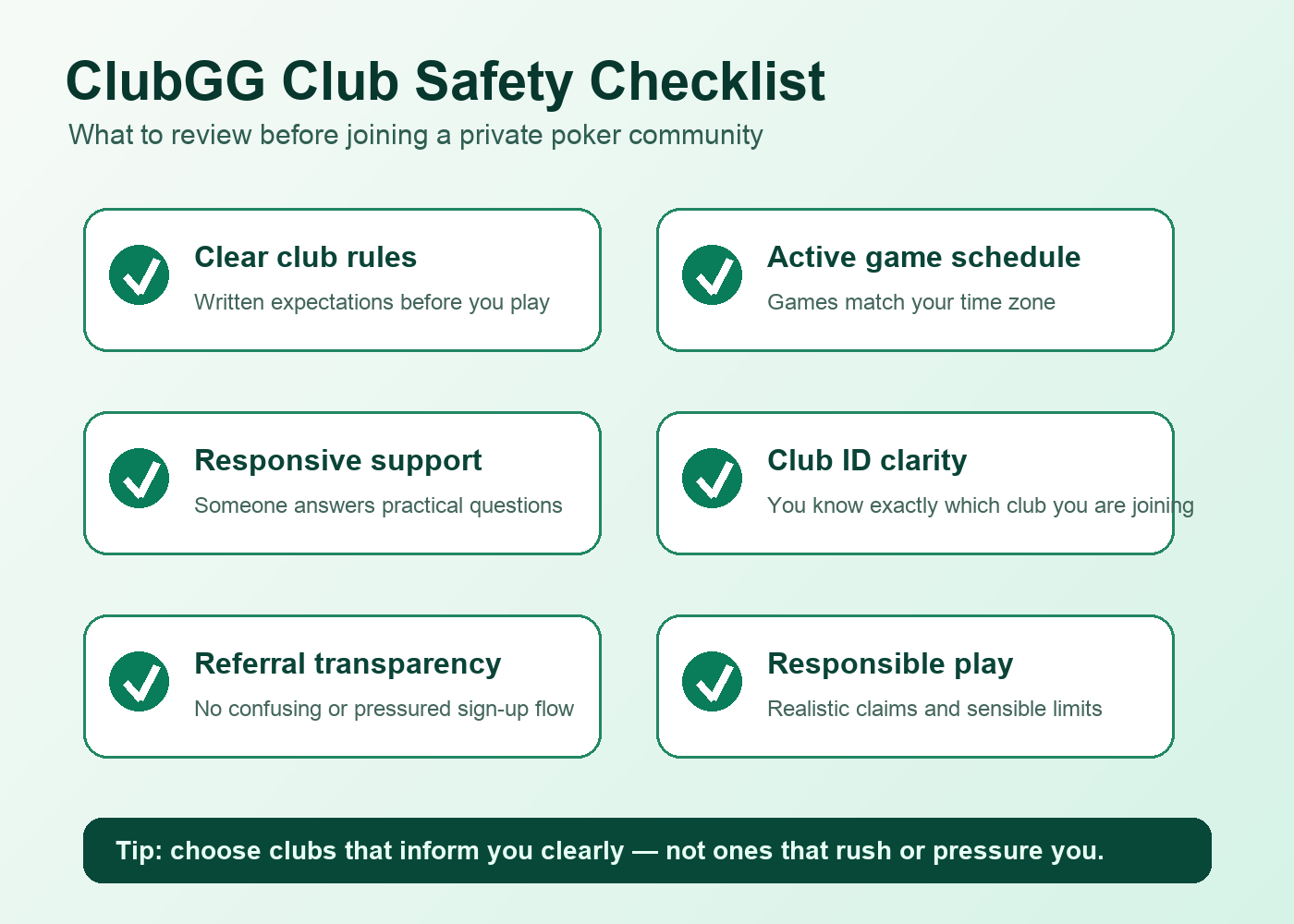
You can judge a club by how it handles four ordinary things. None of them require insider knowledge, and all of them are visible before you sit down.
Rules that exist in writing
A club that publishes its rulebook somewhere durable — a pinned message, a shared document, a club page — is telling you it expects to be held to those rules. Ask where they live. If the answer is “everyone just knows how we do things”, you are relying on the memory of whoever happens to be moderating at an awkward hour.
Written rules also shorten arguments, because a dispute stops being about what someone meant and becomes about what the club already agreed. That is a quieter, faster, fairer conversation every time.
Support that answers when nothing is wrong
Test this before you need it. Send a simple question: which formats run on weeknights, what happens if a player disconnects mid-hand, how do you handle a table that empties out. Then watch how long a reply takes.
A club that answers a dull question within an hour will usually answer an urgent one too. A club where support only appears when things are going well has told you something useful, and you have spent nothing but a message finding it out.
A schedule you can plan around
Clubs drift. The ones that stay healthy tend to have a rhythm — regular evenings, a fixed weekly format, tables that fill at roughly the same hour. Predictability matters more than sheer volume.
A club with two dependable sessions a week is easier to organise around than a busy chat channel with empty tables. Ask when the room is at its best, and check whether that answer lines up with the hours you actually play.
Moderators who act rather than watch
Slow play, chat that turns hostile, someone sitting out for twenty minutes at a time — every club has these moments. What differs is the response.
During your first few sessions, note how quickly a moderator steps in and whether the response is consistent between members. Consistency matters more than severity. A club where the same behaviour gets the same reaction regardless of who is doing it is a club where you can relax and play your hands.
How to vet a club before you send a join request
This is the part most people skip, and it is the part that saves the most time. Run through these before you request membership, not after:
- The club name matches the identifier exactly, confirmed from two sources.
- The rules are readable before you join, not revealed afterwards.
- There is an identifiable support channel, and someone has answered a question in it recently.
- The person who invited you can explain, in plain words, how the club handles a disagreement.
- Tables are active during the hours you genuinely play, not just during a launch week.
- The club states an age requirement and clearly expects members to meet it.
- Nobody asks for details that have nothing to do with playing.
- There is a straightforward way to leave, and it does not involve an awkward conversation with someone who has your contact details.
If three or more of those come back unclear, treat it as an answer in itself. A club that cannot be described simply is usually a club that has not decided how it wants to operate yet.
Red flags that should end the conversation
Some signals are strong enough that the sensible move is to close the chat and walk away, however friendly the invitation sounded.
- Urgency. “Join tonight or the place goes” is pressure, not process. Genuine clubs will still exist tomorrow.
- No written rules. Or rules that exist only as screenshots of a conversation that has scrolled away.
- A name that almost matches a well-known club. Near-misses are a common trick and cost you nothing to avoid.
- Fast answers while you join, silence afterwards. Responsiveness that switches off once you are inside is a pattern, not a coincidence.
- Promises about how you will do. Any club that predicts outcomes for you is telling you what it thinks you want to hear rather than what it can control.
- Requests for information unrelated to playing. Identity documents, workplace details, anything that feels like building a file on you.
- One moderator who is also the person you would complain about, with no second route to raise a problem.
- Chat where new members are mocked for asking basic questions. That culture spreads quickly and it does not stay confined to the chat.
- Any suggestion that the club sits outside the laws where you live. Laws vary by location and apply to you wherever you are, whatever the club’s attitude happens to be.
None of these require you to accuse anyone of anything. You simply stop replying, and you keep your identifier for a club that has receive the trust.
Reading the rules like someone who will disagree with them later
Most people skim a club’s rules once, agree with all of it in the abstract, and never look again. Then a disagreement arrives and nobody remembers the detail that mattered.
Read them properly, once, while you are calm. Pay attention to these in particular:
- Format and level structure — what is played, how levels progress, and how long a typical session runs.
- Table size and seating — how many players, whether seats are reserved, and what happens when someone steps away.
- Disconnection policy — the single most common source of arguments in any club, and the one most often left vague.
- Chat conduct — what is tolerated, what is not, and who decides.
- Dispute route — who you contact, in what order, and what the club promises to do about it.
- Removal and leaving — the process for being asked to leave, and the process for deciding to leave yourself.
Two useful habits. First, ask one clarifying question before you join: “If a player disconnects and the table keeps playing, what happens?” The answer tells you whether the rules are real or decorative. Second, keep the rules somewhere you can find them again. Rules that live only in a group chat scroll out of reach within a week.
Where to find clubs, and what a directory cannot tell you
A directory is a starting point, not a verdict. The ClubGG clubs directory gathers club names, identifiers and descriptions in one place so you are not relying entirely on forwarded codes. That is genuinely useful, because it gives you something to check a code against.
What it cannot do is sit inside a room at eleven at night and see whether the tables fill, or watch how a moderator handles a bad-tempered argument in chat. Use a listing to build a shortlist of two or three clubs, then verify each one using the checks above. A directory narrows the field; it does not decide for you.
Reading a club page properly: Splash Mountain
The Splash Mountain club page is a useful example of how to read any listing. Start with the name and the identifier — those two must agree everywhere you see them. Then look at how the club describes its formats and its schedule. Anything vague in a description is a question for the club itself, not a reason to guess.
Treat every listing as a set of claims to verify. A good page leaves you with three specific questions. A thin page leaves you with twenty, and that is information too.
Reading a club page properly: Temporal Tilt
The Temporal Tilt club page is worth reading the same way: name, identifier, formats, timing, and how the club says it handles support. Notice whether the description mentions rules at all. Clubs that talk about their rulebook before they talk about anything else tend to be the ones that run on it.
If two listings look equally appealing on paper, the tie-breaker is not the description. It is which club answers a question first.
When something goes wrong in the middle of a session
Problems at the table usually come in three flavours: a technical fault, a disagreement about a hand, or behaviour in chat that crosses a line. Each one has a sensible order of operations.
- Note the basics. Time, table, hand number if it is visible, and a screenshot. Memory is unreliable twenty minutes later.
- Do not argue it out in public chat. Nothing escalates faster, and you lose the chance to explain yourself calmly.
- Contact the club’s support channel first. Club support knows its own rules and can usually resolve things quickly.
- Give the club a fair window to respond — the one its own rules describe, if it has one.
- If the club goes quiet, escalate to the app’s support. Platform support handles problems the club cannot or will not.
- Decide separately whether you still want to be there. A resolved dispute in a badly run club is still a badly run club.
If you have worked through those steps and still need a route in, the contact page is the place to use. Keep your message short: what happened, when, what you have already tried, and what outcome you are asking for.
Playing with people you have never met
Club tables are social spaces, and most of the people in them are perfectly ordinary. A few habits keep it that way.
Keep conversations on the game unless you are happy for them to leave the game. That means no phone numbers in club chat, no moving to private messaging with someone you have played with twice, and no sharing details about where you live or work. There is no upside to it and a long list of small annoyances on the other side.
Watch your own state, not just the table’s. Sessions run long in clubs with a good atmosphere, and tired play looks a lot like bad luck. Step away when you notice you are playing on autopilot, and come back to a table you actually want to sit at.
And use the exit. If a table turns unpleasant, leaving is not a dramatic statement — it is a normal thing that experienced players do without comment. Clubs with healthy cultures are usually the ones where people feel free to walk away mid-session.
Related reading: see our ClubGG vs GGPoker guide for a focused walkthrough on this topic.
FAQ about ClubGG clubs
What is a club identifier, and where do I find one?
A club identifier is the short code that points to one specific club inside the app, and you find it from the club itself, from a member you trust, or from a checked directory listing. Without it you cannot search your way into a particular club, because there is no public index of every room. Treat the identifier and the club name as a matched pair, and confirm both before you send a join request.
Can I belong to more than one ClubGG club at the same time?
Usually yes — the app is built so that one player can hold membership in several clubs and move between them. Each club still sets its own membership rules, and some prefer members who play mainly with them, so read the rules of each one rather than assuming the same expectations apply everywhere.
How do I check whether a club is safe before joining?
Start by confirming the club name against the identifier from two independent sources, then look for written rules, a support channel that has answered a question recently, and tables that fill during the hours you play. If any of those three is missing, ask the club directly before joining. The answer — or the silence — is the check.
What should I do if a club’s rules are unclear?
Ask one specific question and see how it is answered. “If a player disconnects mid-hand, what happens to the table?” works well because it has no vague answer. A club that replies clearly and quickly has shown you how it handles everything else. A club that deflects has shown you that as well.
Is joining a ClubGG club legal where I live?
Laws vary by location, and only a qualified professional in your own jurisdiction can answer that for you. This page is informational and is not legal or gambling advice. Before joining any club, check the rules that apply where you are, and treat any club that waves the question away as one to avoid.
Do I have to share personal details to join a club?
No. Joining a club requires an identifier, a profile name and a request, and nothing more. If a club asks for identity documents, workplace details or anything unrelated to playing, that is a red flag rather than a routine step, and you are free to stop the conversation there.
What if a club stops responding after I join?
Screenshot the situation, take it to the club’s own support channel with a short factual message, and give the club the response window its rules describe. If nothing comes back, escalate to the app’s support and start looking at other clubs on your shortlist. A club that cannot answer a member is not a club that will resolve anything at a table.
A club is only ever as good as its written rules and the people who follow them. Get the identifier right, check the name twice, read the rulebook once while you are calm, and test support before you need it. Do those four things and you will spend your time playing hands instead of chasing answers — and if you want a second opinion on where to look, the club directory is a reasonable place to start building that shortlist.